What Is IPTV? A Clear Guide to Internet Protocol Television
LINK HERE BEST IPTV UK FREE TRIAL 24H What if the most important thing to know about IPTV isn’t how the technology works, but who has the right to show the programmes? If you’re asking "what is iptv", you’re not alone. The jargon can make it sound complicated, while big claims about channel numbers, picture quality and reliability can be difficult to compare.
The basic idea is straightforward: IPTV delivers television over an internet connection rather than through traditional broadcast, cable or satellite delivery. But the technology is separate from the service using it and from the content it offers. A polished app or a promise of thousands of channels doesn’t, by itself, tell you whether a provider has permission to distribute them.
This guide explains IPTV in plain English, compares it with traditional TV and sets out what to check before choosing a service. You’ll also find practical questions to ask about compatible devices, streaming quality, reliability and content rights as a UK viewer. No technical background is needed, just the essentials to help you make an informed choice.
Key Takeaways
- Learn what is iptv by following a simple overview of how a television stream travels from a provider to a compatible device.
- Compare IPTV with traditional TV by looking at delivery, internet dependence and the equipment you may need.
- Understand why legality depends on the rights for the service and content, not simply on IPTV technology itself.
- Use a practical checklist to ask providers about transparency, terms, support, device compatibility and streaming quality.
- Assess a provider’s stated trial and subscription options without treating them as proof of suitability or content rights.
What Is IPTV? The Meaning of Internet Protocol Television
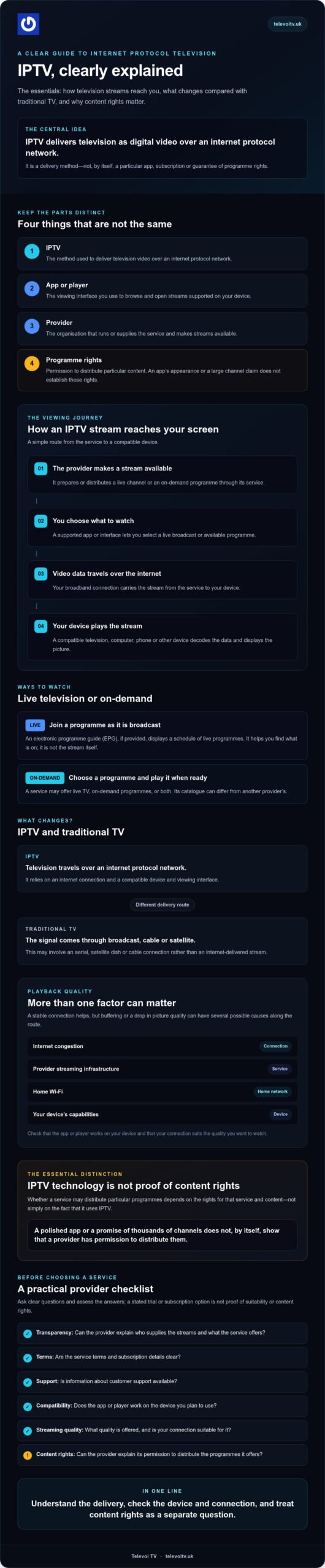
If you’re asking "what is iptv", start with the delivery method, not a particular app or channel package. IPTV delivers television using internet protocol over a network. That network carries video data to a viewer’s device, much as other digital information travels between connected devices.
IPTV is television delivered as digital video over an internet protocol network rather than by traditional broadcast, cable or satellite transmission.
IPTV describes how television reaches you. It doesn’t identify a particular app, device or subscription, and the label alone doesn’t tell you what programmes a service provides. Some IPTV services carry live television, which you watch as it’s broadcast. Others offer on-demand programmes that you choose and play when you’re ready. A service may offer either or both.
What does IPTV stand for?
IPTV stands for Internet Protocol Television. Internet protocol is the set of rules devices use to send and receive data across a network. Rather than receiving a television signal through an aerial or satellite dish, an IPTV viewer receives a video stream over an internet protocol network. For a broader overview of the term and its technical background, see What is Internet Protocol Television?
Is IPTV the same as a streaming app?
No. An app can be the way you access an IPTV service, but the app and the delivery method aren’t the same thing. Keep the parts distinct: IPTV is the delivery method, the app is the viewing interface, the provider runs or supplies the service, and programme rights determine whether that provider has permission to distribute particular content.
This distinction helps you look beyond the interface. A familiar-looking app doesn’t establish who supplies the streams or whether the provider has the relevant rights. And not every video service that uses the internet is IPTV in the same technical sense. Online clips, video calls and other internet video may use different delivery systems. Focus on what a provider offers, how it delivers it and what rights it can explain.
How IPTV Delivers Live TV and On-Demand Programmes
IPTV uses internet protocol to deliver television content as video data across a network to a viewer’s connected device. The route is simple in principle: a service makes the stream available, your internet connection carries it, and a compatible app or interface lets you watch. The details vary between providers and services.
What happens when you watch an IPTV stream?
Here’s the basic journey:
- The provider makes a stream available. It prepares or distributes a live channel or on-demand programme through its service.
- You choose what to watch. Using a supported app or interface, you select a live broadcast or an available programme.
- Video data travels over the internet. Your broadband connection carries the stream from the service to your device.
- Your device plays the stream. A compatible television, computer, phone or other device decodes the data and displays the picture.
With live TV, you join a programme while it’s being broadcast. On-demand playback lets you select a programme from a library and start watching when you choose. A provider’s catalogue can differ in size and content, and not every IPTV service offers both types of viewing.
A stable connection helps, but it isn’t the only factor. Internet congestion, the provider’s streaming infrastructure, your home Wi-Fi and your device’s capabilities can all affect playback. If a picture buffers or drops in quality, the cause could be anywhere along that route.
What do broadband, apps and programme guides do?
Broadband is the connection carrying video data between the service and your home. The app or player is the viewing interface: it helps you browse and open streams supported on your device. An electronic programme guide, or EPG, displays a schedule of live programmes if the service provides one. It can make it easier to find what’s on, but it’s a guide, not the stream itself.
Before trying a service, check that its app or player works on your device and that your connection is suitable for the quality you want to watch. You can also review an IPTV service’s access details before deciding whether to explore its offer.
IPTV vs Traditional TV: What Changes, and Is IPTV Legal?
IPTV changes the route television takes to reach you. Instead of receiving a signal through an aerial, satellite dish or cable connection, the programme is delivered over an internet protocol network. That affects the connection and compatible equipment you’ll need, but it doesn’t automatically make one option better. The service, your home setup and what you want to watch all matter.
| Delivery method | How it reaches your home | Internet dependence | Typical equipment |
|---|---|---|---|
| Aerial | Broadcast signal received by an aerial | Not usually needed to receive broadcast channels | Aerial and compatible television or tuner |
| Satellite | Signal received from a satellite dish | Not usually needed for the satellite signal | Dish and compatible receiver or television |
| Cable | Signal delivered through a cable network | Depends on the provider’s service setup | Compatible connection and television or receiver |
| IPTV | Stream delivered over an internet protocol network | Yes, a suitable internet connection is needed | Compatible connected device and supported app or interface |
How is IPTV different from aerial, satellite and cable TV?
With IPTV, a compatible television, computer, phone or other supported device may be able to play a stream, depending on the provider. This can give you flexibility about where you watch, but it relies on internet access and a supported setup. Traditional delivery methods have their own equipment and coverage considerations. Channel availability and extra features vary by service, so check the details rather than assuming every IPTV offer works the same way.
Is IPTV legal in the UK?
IPTV itself is a delivery method, not a guarantee that a service or its programmes are authorised. The key question is whether the provider has the relevant rights to distribute the content it offers. A VPN doesn’t establish those rights or prove that a service is legitimate.
Before subscribing, look for a clearly identified provider, readable terms, information about the content and its distribution rights, and credible ways to contact customer support. Be cautious if important details are missing or claims are difficult to verify. These checks can help you assess a service, but they aren’t a substitute for legal advice. For a specific provider, channel or programme, seek current expert verification before making a legal judgement.
How to Assess an IPTV Service Before You Sign Up
Big channel counts and promises of crisp resolution can sound impressive, but they don’t tell you whether a service suits your devices, connection or expectations. Before paying, check the details you can verify, not just the headline claims.
Which service details should you verify?
Start with the provider. Look for a clear business identity and a way to contact its support team. Then read the terms before entering payment details, paying close attention to the pass duration, whether it renews and how cancellation works.
- Provider identity: Can you tell who operates the service and how to contact them?
- Terms: Are duration, renewal and cancellation arrangements explained clearly?
- Content rights: Does the provider explain its authority to distribute the content it lists?
- Channel information: Are availability and any limits described plainly?
If rights information is unclear, ask the provider for an explanation. A large catalogue or a simple sign-up process isn’t evidence of distribution rights. Keep claims about a specific service or programme separate from general information about IPTV.
How can you judge quality and device compatibility?
Check the provider’s supported devices and any app or player requirements before signing up. If a trial is available, use it to test the service on the device and home connection you plan to use. Try the types of viewing you care about, such as live streams or on-demand playback, and note any buffering, interruptions or changes in picture quality. It’s also worth understanding how IPTV instant activation UK works in practice, since receiving access details is a separate step from configuring your device and testing a stream.
Advertised resolution describes a possible format, not a promise that every programme will stream at that quality. A large library doesn’t guarantee that every listed title will be available when you want it, either. Treat catalogue size, resolution and uptime figures as provider claims to check against the actual experience and the terms.
A useful IPTV checklist: verify the provider, rights information, terms, support, device requirements and real-world performance; treat promotional figures as claims until you can check them.
Use that checklist for any provider, including Televoi TV subscription options. Compare the stated terms with what you need, and use any available trial to test compatibility and viewing quality rather than assuming it guarantees a suitable service.
What IPTV Means for Televoi TV Customers
The general definition now has a practical example. Televoi TV describes itself as a subscription-based IPTV service for customers in the UK. It delivers television over the internet. That’s an example of the delivery method, not proof of what rights apply to any particular programme.
How does Televoi TV fit the IPTV definition?
Televoi TV states that its service includes more than 65,000 live channels and over 195,000 movies and series, with HD and 4K streaming on compatible devices. These are provider-specific claims, not features that define IPTV or a guarantee that every stream will play at a particular resolution. Check the latest service information for current catalogue details rather than relying on a headline library figure.
Televoi TV offers fixed-term subscriptions in 1, 3, 6 and 12-month durations, with plans starting at £12.99 per month. Its subscription passes are paid upfront, without recurring direct debits or long-term binding service contracts. Provider information also describes a 24-hour free trial. Check whether it’s currently available and read its conditions before relying on it. A trial can help you assess how the service works for you, but it doesn’t establish whether the provider has distribution rights for specific content.
Access is described as available across compatible devices. That doesn’t mean every television, phone or app will work, so confirm the current compatibility details first. IPTV access is a service, not a hardware streaming box, satellite installation or cable television contract.
What can a viewer check before trying a service?
Before signing up or starting a trial, review the practical details. Check which devices and apps are supported, what connection the provider recommends, how long the trial lasts and what happens when it ends. Read the pass terms and look for clear support contact details. If a particular channel or programme matters to you, ask the provider about its rights to distribute that content. If you want a step-by-step walkthrough of what to prepare and expect once you subscribe, see this guide to getting started with IPTV instant activation in the UK.
Televoi TV also makes claims about service performance and other features, including server uptime and built-in VPN protection. Treat statements about uptime, VPN protection and picture quality as claims to check against current information. A VPN doesn’t prove that content is licensed, and a stated resolution doesn’t guarantee the same viewing experience on every device or connection.
If you’re weighing up what is iptv in practice, use the same checklist for any provider: verify the terms, confirm compatibility and assess the claims for yourself. You can review Televoi TV’s current service information to see what it offers, without treating a trial as a commitment or a guarantee of suitability.
Make Your Next IPTV Choice with Confidence
Now you know what is iptv: a way of delivering television over an internet network, not a guarantee about a provider’s content or rights. The service’s app, catalogue and device support are separate details to check. Picture quality depends on more than advertised resolution, so test the experience on your own connection where possible.
Before choosing, confirm who operates the service, read its terms, check device compatibility and look for clear information about content rights. Televoi TV states that it offers live channels and an on-demand library, along with a 24-hour free trial and fixed-term passes. Its pass options are available for 1, 3, 6 and 12 months. These are provider-specific details, so check the current terms, trial conditions and compatibility information before deciding. A trial can help you assess the viewing experience, but it doesn’t establish content rights.
Ready to compare the details with your viewing needs? Explore Televoi TV’s current service and subscription options.
Frequently Asked Questions
How does IPTV work on a television?
IPTV works by sending a video stream over an internet connection to a compatible television or other device. You choose a programme using the provider’s supported app or interface, and the device plays the stream. Depending on the service, you might select live television or an on-demand programme. The provider, your network connection and your device can all affect playback and picture quality.
Do you need broadband to watch IPTV?
Usually, yes. IPTV streams television over an internet protocol network, so you need an internet connection capable of carrying the video. A stable connection helps reduce interruptions, but the experience can also depend on network congestion, your home Wi-Fi, the device and the provider. Check the provider’s connection requirements and test the service on your own setup, especially if a trial is available.
What is the difference between IPTV and streaming services?
IPTV describes a way of delivering television over an internet protocol network. A streaming service is the platform or provider you use to watch video, often through an app. The terms can overlap, as a service may use IPTV delivery, but they aren’t interchangeable. Not all internet video uses IPTV in the same technical sense. Check how a provider delivers content and what its service includes.
Can you watch IPTV without a set-top box?
Yes, if the IPTV provider supports an app or player on a device you already own, such as a compatible smart television, phone, tablet or computer. You don’t necessarily need a separate set-top box. Compatibility varies by service, though, so check the provider’s supported devices and any software requirements before subscribing. If your device isn’t supported, you may need another compatible way to access the service.
Do you need a VPN to use IPTV?
Not necessarily. Whether a VPN is required depends on the provider’s setup and terms, so check its current guidance before connecting. A VPN doesn’t confirm that a service has the rights to distribute its programmes, and it shouldn’t be treated as a way to make unauthorised content legitimate. Assess the provider and its content rights separately, and don’t assume a VPN will improve stream quality or reliability.