IPTV Instead of Cable TV in the UK: Is Switching Worth It?
Could IPTV replace your cable TV without bringing new costs or viewing headaches? The answer depends less on a headline channel count than on your broadband, the programmes you watch and the provider’s terms. If you’re weighing up iptv instead of cable tv uk, check the trade-offs before changing your current service.FREE TRIAL 24H
If flexible subscription periods matter to you, review IPTV subscription options and compare their terms with your current service before deciding.
IPTV can offer flexible viewing on compatible devices, but it relies on your internet connection. A broadband drop or a busy home network could interrupt a programme, whilst cable or satellite may suit viewers who prefer a separate TV connection. A large channel list isn’t enough on its own: check what content is included, whether the provider has the rights to distribute it, and what you’ll pay and for how long.
This guide compares IPTV and cable TV in practical terms, including connection reliability, content, devices and service terms. You’ll find out what to check before cancelling or changing an existing package, and how a fixed-term pass or trial could help you test a service on your own connection and compatible device. That way, you can choose the option that fits your household’s viewing habits rather than relying on headline promises.
Key Takeaways
- Understand how IPTV delivers TV over the internet, and why the delivery method alone doesn’t tell you what content a provider can offer.
- When comparing iptv instead of cable tv uk, check the actual channel line-up, catch-up options and recording features rather than relying on headline catalogue sizes.
- Assess reliability by considering both your home connection and the provider’s service. Interruptions can have more than one cause.
- Before switching, review your existing contract and cancellation terms, then list the channels, programmes and accessibility features your household needs.
- Check a provider’s content rights, service terms, support and compatible devices before choosing a subscription.
IPTV instead of cable TV: what actually changes for UK viewers?
You want more choice and flexibility without disrupting familiar viewing routines. The main difference is how the television signal reaches you, not a guarantee of what you’ll be able to watch. IPTV is television delivered over an internet connection. The term describes the delivery method; the provider, programme catalogue and rights to distribute content are separate matters. For a neutral overview of the technology, see Internet Protocol television (IPTV). If you’d like a plain-English explanation of how the technology works and what to check before choosing a service, read this guide to what is IPTV and how internet protocol television actually works.
How does IPTV differ from cable television?
With IPTV, a provider sends video over the internet for you to watch through a compatible device or app. Cable television uses a cable connection, but the equipment and package you need depend on the provider. Compare the practical details, not just the delivery label.
| What to compare | IPTV | Cable TV |
|---|---|---|
| Delivery | Over an internet connection; check how the service is delivered. | Through a cable connection; check what connection and installation are required. |
| Connection needs | Requires working internet; check recommended speeds and how your home network may affect performance. | Depends on the provider’s network and setup; ask what happens if service is disrupted. |
| Equipment | Requires a compatible device; verify supported models and any app requirements. | Equipment varies; confirm what’s supplied, included or needed. |
| Content and features | Channels and on-demand options depend on the provider and subscription. | Line-up, catch-up and recording features vary by package. |
| Service terms | Check payment, subscription length and cancellation terms. | Review package terms, minimum commitment and cancellation conditions. |
IPTV technology alone doesn’t establish that a provider is authorised to offer every channel or programme. Check the specific content and provider terms before subscribing.
What does switching mean in everyday use?
Your viewing routine may feel familiar: select live television for a scheduled programme, or choose an on-demand title if the service includes it. The difference is that IPTV relies on a compatible device and a working internet connection. Some services support viewing on more than one screen, but don’t assume this is included. Check the device list, simultaneous-use rules and features for the subscription you’re considering.
If you’re weighing up "iptv instead of cable tv uk", start by listing your household’s must-watch channels and how you use catch-up or recordings. Then compare those requirements with each provider’s actual offer. A large advertised catalogue doesn’t mean every familiar channel, feature or programme is available with the subscription you choose.
IPTV or cable TV: compare the trade-offs that affect daily viewing
IPTV can make it easier to explore live and on-demand viewing, but it relies on a suitable internet connection. Cable TV uses a separate delivery setup, although its packages and performance still depend on the provider. Neither option is automatically cheaper, more reliable or a better fit for every household. Compare what you’ll actually watch and the terms attached to each service.
Does IPTV need faster or more reliable broadband?
IPTV needs a working connection. Streaming quality can be affected by broadband speed, Wi-Fi strength, network congestion and how many people are using the connection at once. The provider’s servers and service can also affect viewing, so an interruption doesn’t automatically point to a broadband fault. Check the provider’s current speed recommendations for your intended picture quality. Test Wi-Fi where you watch; if the signal is weak, try moving closer to the router or using Ethernet where practical.
Your IPTV subscription and broadband contract are separate services, with different providers and terms. Switching your television package doesn’t automatically change your broadband agreement. Before committing, consider whether your connection can support your household’s usual viewing and other online activity at the same time.
What features should you compare before deciding?
Make a short checklist before comparing offers. Match the channels and specific programmes you care about against the provider’s current catalogue. Then confirm whether catch-up, on-demand viewing and recording are included, and whether subtitles or other accessibility features are available for the content you watch.
- Devices: Check that your intended screen is supported.
- Multiple viewers: Confirm whether you can watch on more than one device at once.
- Terms: Read the cancellation, renewal and refund conditions before paying.
- Help: Check how to contact support and what assistance is covered.
Use this balanced view to decide whether iptv instead of cable tv uk fits your routines:
| Option | Potential advantages | Points to check |
|---|---|---|
| IPTV | Internet delivery may offer flexible access to live and on-demand viewing, depending on the subscription. | Connection quality, device compatibility, catalogue, simultaneous viewing and subscription terms. |
| Cable TV | A familiar service with package features that may suit established viewing habits. | Available channels, equipment, package conditions and how the service performs at home. |
If flexible subscription periods matter to you, review IPTV subscription options and compare their terms with your current service before deciding.
Is IPTV reliable enough to replace cable TV at home?
It can be, but reliability depends on more than one link in the chain. Your home internet connection carries the stream, and the IPTV provider’s servers and service must also be available. A problem with either can interrupt viewing. Your device, app and home network can contribute too, so buffering doesn’t automatically mean your broadband provider is at fault.
No delivery method or provider should be described as interruption-proof without evidence. If you’re considering iptv instead of cable tv uk, assess how the service performs on the connection and device you’ll actually use, including at the times your household is most likely to watch.
What can affect IPTV streaming quality?
Several factors can affect picture quality or cause pauses. A weak Wi-Fi signal, network congestion, other household members using the connection, or a device struggling to run the app may all contribute. HD and 4K streams can have different connection requirements, so check the provider’s current recommendations for the quality you want. A speed test in one room won’t necessarily reflect Wi-Fi performance beside the television.
Test with your intended device in your usual viewing location. If practical, compare Wi-Fi with a wired Ethernet connection. This can help you work out whether the home network is contributing to the issue, although it can’t rule out a problem with the device or provider.
What should you do if IPTV buffers or stops?
Try these checks before deciding where the fault lies:
- Check other devices: See whether websites or other online services work on the same connection.
- Check stability: Notice whether the issue affects one stream or other online activity too.
- Check Wi-Fi: Try viewing closer to the router, or use Ethernet if it’s practical.
- Check the provider: Look for service-status information or ask whether there’s a known issue.
- Try basic restarts: Close and reopen the viewing app. You can also restart your router or device, but this isn’t a guaranteed fix.
If the problem continues, contact the provider’s support team. Share the device and app you’re using, when the issue happened, what you were watching and whether other online services worked. Those details can help distinguish a local connection issue from a device or provider problem.
A trial, where available, can help you test performance on your own connection and compatible device before committing. Try it during normal household use, not only when the network is quiet, and check the provider’s terms before signing up.
How to prepare before switching from cable TV to IPTV
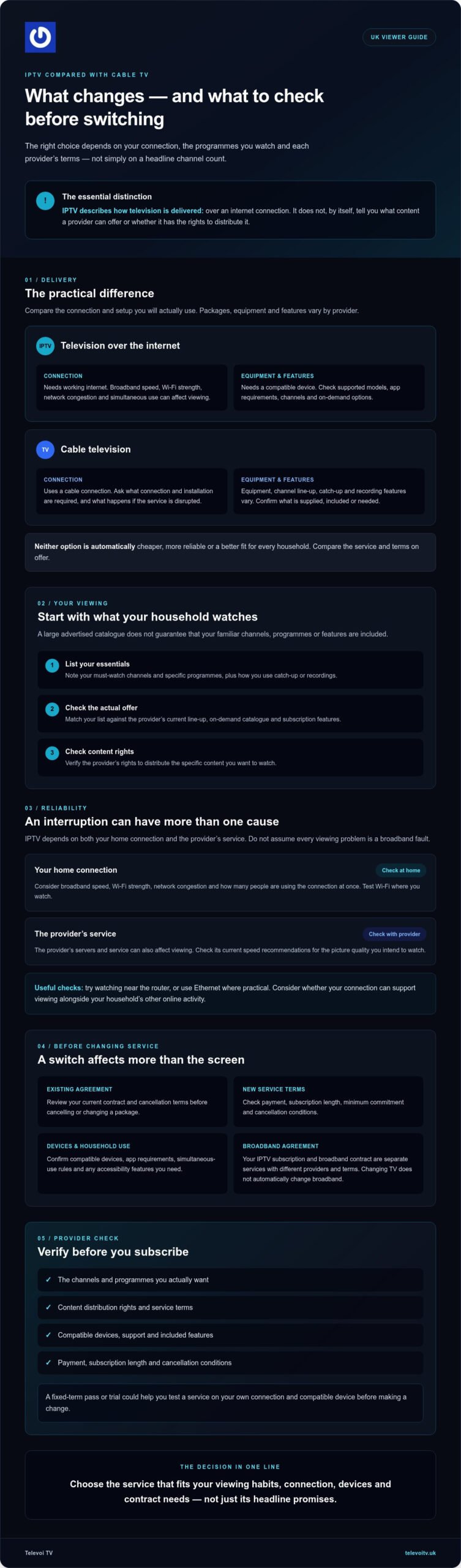
Switch in the right order: check what you’re committed to, confirm the replacement covers your needs, then test how it works at home. Don’t cancel first and hope the details fall into place afterwards. A little preparation can help you avoid losing a package you still need or finding out that a key channel, feature or device isn’t supported.
Check your current cable TV agreement first
Start with your current provider’s account information or ask them directly. Confirm your package end date, notice period, cancellation process, any exit terms and whether equipment must be returned. Don’t assume the conditions are the same as another provider’s, or that cancelling TV also cancels a separate broadband service.
Keep a record of your cancellation request and any confirmation, including the agreed end date. If you’re still within a minimum term, check what charges or conditions may apply before making a change.
Test the connection and viewing devices
Check the IPTV provider’s current compatibility information for the television or device you plan to use. Then test in your usual viewing room at a typical busy time. A connection that seems fine beside the router may behave differently elsewhere, especially when other people at home are online.
Compare your broadband package and home network with the provider’s stated requirements. Check whether your internet allowance suits your household’s streaming habits, and confirm any limits on simultaneous streams. If a trial is available, use it to assess the service on your own connection and compatible device before cancelling cable. Televoi TV advertises a 24-hour free trial, but check its current availability and terms before relying on it. Once you’ve subscribed, it’s worth understanding what to expect next: IPTV instant activation in the UK works differently from device setup, so knowing what to prepare before your access details arrive can save time and avoid confusion.
Use this quick checklist before you decide:
- Must-watch content: List the channels, programmes and on-demand titles your household expects to find. Check that they’re included in the specific subscription you’re considering.
- Accessibility: Note any requirements, such as subtitles, and verify their availability for the programmes you watch.
- Viewing routines: Consider who watches, which screens they use and whether anyone needs to watch at the same time.
- Service terms: Read the IPTV provider’s payment, renewal, cancellation and refund conditions. These are separate from your cable and broadband agreements.
- Trial and support: Confirm what a trial includes, how long it lasts and how to contact the provider if you need help.
If you’re considering iptv instead of cable tv uk, compare verified details with your checklist, not just the headline offer. Explore Televoi TV and check the current service details before choosing a subscription.
Choosing an IPTV provider instead of cable TV: what to verify
A polished website or a huge channel count isn’t enough to judge an IPTV service. Before choosing iptv instead of cable tv uk, check what the provider says it offers, what it can demonstrate and what its terms commit you to. IPTV describes how television is delivered. It doesn’t, by itself, prove that a provider has permission to distribute particular channels or programmes.
How can viewers assess an IPTV service responsibly?
Look for clear, consistent information about the company, the content it offers and the rights behind that content. A large advertised catalogue doesn’t confirm that every title is currently available or authorised. Ask specific questions if the provider’s explanation is unclear.
Read the terms before paying. Check the subscription length, payment arrangements, renewal and cancellation conditions, refunds, privacy information and how to raise a service complaint. Confirm the supported devices and any limits on simultaneous viewing. Find out how to contact support and what help it covers.
Keep claims in perspective. A free trial may help you assess usability, but it isn’t proof of content rights. The same applies to a VPN feature or an uptime claim. Treat each as a separate detail to verify, not as evidence that the service is authorised or guaranteed to work without interruption. For a fuller explanation of how internet protocol television works and what questions to ask a provider, see this clear guide to what is IPTV before you commit to a subscription.
Could a Televoi TV pass suit your viewing habits?
Televoi TV states that it offers prepaid fixed-term passes lasting one, three, six or twelve months, without recurring direct debits or long-term binding contracts. The service also offers over 65,000 live channels and more than 195,000 movies and series, and supports HD and 4K streaming. Televoi TV advertises a 24-hour free trial. Check the current pass terms, trial availability and conditions directly before deciding.
A trial can give you a chance to explore the service on your own connection and a compatible device. Use that time to check the viewing experience and whether the available content suits your household. Verify current device support and catalogue details with the provider. Don’t assume a particular channel, programme or feature is included just because it appears in a broad promotional claim. Streaming quality can also depend on your device and connection, so advertised HD or 4K support isn’t a performance guarantee. If you decide to go ahead, read about how IPTV instant activation works in the UK and what steps to follow so you know what to expect from the moment your access details arrive to your first stream.
Compare the provider’s answers with your must-have channels, viewing habits and service requirements. If the details are clear and the terms suit you, explore the options at your own pace. Check Televoi TV’s current IPTV options.
Make the switch on your terms
Choosing iptv instead of cable tv uk comes down to your viewing habits, home connection and the details of the provider’s offer. IPTV can bring flexibility, but it depends on internet access, and its channels and features vary. Compare the actual catalogue with your must-watch programmes, check device compatibility and content rights, and review your current contract before cancelling.
Televoi TV states that its passes are fixed-term and prepaid, without recurring direct debits. It also advertises a 24-hour free trial, though you should check availability and terms before signing up. A trial can help you assess the service on your own connection and compatible device rather than relying on promises alone.
Ready to compare the current options? Explore Televoi TV’s current IPTV options. Check the details and choose the viewing setup that suits your home.
Frequently Asked Questions
Is IPTV cheaper than cable TV in the UK?
It can be, but IPTV isn’t automatically cheaper once you compare the full cost of your viewing. Set the IPTV subscription alongside your current TV package, broadband charges and any services you’d keep or add. Check your cable provider’s cancellation terms too, as leaving early may affect the overall cost. Televoi TV states that its passes are prepaid without recurring direct debits, but check the current terms before choosing.
Can IPTV replace cable TV completely?
IPTV can replace cable TV for some households, provided the service carries the channels and features they rely on. Compare its current catalogue with your must-watch programmes, and check catch-up, recording and accessibility options rather than assuming they’re included. You’ll also need compatible equipment and internet access. If you’re considering iptv instead of cable tv uk, make sure the provider’s offer fits your routine before cancelling cable.
Does IPTV need broadband to work?
Yes, IPTV relies on an internet connection to deliver television streams. A suitable, stable connection helps, but performance can also depend on Wi-Fi, your device, other household internet use and the IPTV provider’s service. Check the provider’s current speed and device recommendations for the picture quality you want. If you watch over Wi-Fi, test the signal in the room where you’ll use the service.
Is IPTV legal in the UK?
IPTV technology is legal in the UK, but that doesn’t mean every service or stream is authorised. A provider needs the appropriate rights to distribute the channels and programmes it offers. Don’t judge legitimacy by a large catalogue, a free trial or technical features alone. Look for clear information about content rights, the provider and its terms. If those details are unclear, ask before subscribing.
What equipment do I need to use IPTV instead of cable TV?
You’ll need a working internet connection and a device supported by your chosen IPTV provider. Compatibility varies, so check the provider’s current device requirements and how you access its service before subscribing. Don’t assume your existing cable equipment will work with IPTV, or that a particular app is compatible with every device. Confirm any software requirements and test the service on the screen you plan to use.
What happens if my internet goes down while I am watching IPTV?
If your internet connection drops, an IPTV stream will usually pause or stop until access returns. First check whether other online services work on your devices. If they do, the issue may relate to the IPTV service, app or device rather than broadband alone. Check the provider’s status information, then contact support if the problem continues. A separate TV delivery service may not depend on your home internet connection in the same way.
How much broadband data does IPTV use?
Data use varies with viewing time, stream quality and the provider’s delivery settings. Higher-quality video, such as 4K, can use more data than a lower-resolution stream, but consumption differs between services and programmes. Check your broadband package’s data allowance and any usage information your provider supplies. If you’re unsure, monitor your household’s data use while streaming as you normally would, including when other people are online.