

Stop Chasing Free Codes: Set Up Xtream Codes IPTV Safely in the UK
Xtream Codes are a provider login made up of a host address, a username and a password, which your player uses to fetch live channels, films and series. To get started, add those authorised credentials into an Xtream-capable player and test one stream before relying on it. Only use subscriptions you have paid for through a legitimate provider, since Gov sets out the legal risks of unauthorised access.
TL;DR:
- Using public “free Xtream code” lists is risky, as they are often invalid, change frequently, and do not verify legitimate content access.
- Verified credentials are issued only by legitimate IPTV providers who offer clear support, licensing information, and secure payment options.
- Proper setup requires accurate entry of host, port, username, and password in compatible players, with immediate testing of a single channel to confirm functionality.
- Sharing credentials or storing them in unsecured locations increases the risk of account suspension and personal data compromise.
- The format of the login, whether Xtream API or M3U, is less important than ensuring the subscription originates from a verified and licensed provider.
Table of Contents
- What Xtream Codes are and how they differ from M3U playlists
- Step-by-step: adding Xtream Codes credentials in common players
- Where to find authorised credentials and avoid illicit offers
- Troubleshooting common setup failures
- How TelevoiTV supports Xtream-compatible access
- What actually matters when you set up Xtream Codes
- Get Xtream-compatible access without the guesswork
- FAQ
- Sources
What Xtream Codes are and how they differ from M3U playlists
An Xtream Codes login has four parts: a host address, a port number, a username and a password. Your player sends these details to the provider’s server, which authenticates the request and returns structured data instead of a single file. According to GridStreamr’s technical guide, this typically includes:
- Live categories, channels and stream URLs organised by genre
- Movies and series listed separately, each with its own metadata
- An electronic programme guide where the provider supplies one
- Optional catch-up or archive access, again only if the provider enables it
An M3U playlist, by contrast, is a flat text file the app downloads once and parses locally. It works, but it cannot offer the dynamic categories or on-demand browsing that an Xtream login supports. It is worth remembering that “Xtream Codes” describes a login pattern and a panel architecture, not one specific content provider. Many separate services use this same API structure, so the credentials you receive are only as trustworthy as the company that issued them.
Step-by-step: adding Xtream Codes credentials in common players
Most Xtream-capable apps follow the same basic flow, whether you are on a phone, a Fire Stick or a Smart TV.
- Open your player and choose the option for “Xtream Codes” or “Xtream API” rather than M3U.
- Enter the host address exactly as given, including http:// or https:// and the port number.
- Type your username precisely, avoiding leading or trailing spaces.
- Enter your password the same way.
- Save the profile and let the app sync the channel and VOD lists.
- Play a single well-known channel first to confirm the connection works.
- Check whether the electronic programme guide has populated, since this depends on provider support.
- If catch-up or archive options appear greyed out, treat that as provider-side rather than a fault in your settings.
On Android and Android TV apps such as IPTV Smarters or TiviMate, the relevant fields are usually labelled “Server URL” (or “DNS”), “Username” and “Password”, sometimes grouped under an “Xtream Codes API” login screen. Our own IPTV Smarters Pro setup guide walks through these fields on Android step by step. Feature sets vary between apps: some surface multi-day catch-up and favourites, others stick to a basic channel list, a pattern confirmed by app-store listings for several Xtream-compatible players, which also state plainly that they supply no content of their own.
Pro Tip: Save your host, username and password in a password manager rather than a screenshot, and never paste them into a public forum when asking for help.
Keep your credentials private in the same way you would a banking login. Sharing them, even with a friend, risks breaching your provider’s connection limit and can get the account suspended.
Where to find authorised credentials and avoid illicit offers
Public “free Xtream code” lists and PDFs circulating online are not a safe shortcut. These lists are rarely issued by the rights holder, change without warning, and often stop working within days because the underlying account gets shut down or blocked.
Under GOV.UK guidance, a device or app becomes illicit the moment it is used to stream paid-for films, subscription television or sport without proper authorisation. The guidance does not criminalise ordinary players; the issue is always whether the underlying content access has been paid for and permitted.
Public repositories on platforms such as GitHub host Xtream-capable player code and playlist collections, but these projects do not verify that the content behind any given login is authorised, so treat them as software, not as proof of legitimacy.
Before trusting any provider, check for:
- A visible way to contact support beyond a single messaging app
- Clear written terms covering refunds and cancellation
- Secure, trackable payment processing rather than untraceable transfers
- Some indication that content is licensed rather than simply “all channels included”
Our guide on choosing an IPTV subscription covers these checks in more detail, including how to spot misleading “all sports” claims.
Troubleshooting common setup failures
Most activation problems come down to a handful of repeatable mistakes rather than anything wrong with the player itself.
- Pasting an M3U link into the Xtream server field, which the app cannot read correctly
- Leaving out the port number or using the wrong protocol (http instead of https, or vice versa)
- Adding an extra slash or path after the host address
- Mistyping the username or password, including invisible trailing spaces
If the login still fails after double-checking these, the account itself may be expired or over its connection limit. Ask your provider directly for the account’s expiry date and current active connections, since most panels track this information and can confirm it quickly.
Device-side problems are the next most common cause. Older boxes sometimes lack the codec support newer streams use, and some providers cap the number of simultaneous devices per account.
Pro Tip: Test your credentials in a second app or device before assuming the subscription itself is broken, since this quickly separates a player fault from an account issue.
For persistent buffering once login succeeds, check your connection against our 4K streaming requirements guide, since bandwidth shortfalls often look like login errors but are not.
How TelevoiTV supports Xtream-compatible access
We provide Xtream-compatible credentials alongside a large selection of live channels and extensive on-demand films and series in HD quality. New subscribers are covered by a refund policy, which gives you room to confirm everything works on your own devices before committing further.
We also publish setup guides for specific hardware, including IPTV Smarters Pro on Android and the Formuler Box. If you run into an activation or login issue, our support channels are the first place to check before assuming the fault lies with your player.
What actually matters when you set up Xtream Codes
The advice that circulates most widely treats Xtream Codes as a technical puzzle: get the port right, pick the right app, tweak a setting. That is true as far as it goes, but it misses the bigger decision, which is who issued the credentials in the first place. A perfectly entered login still fails you if the account behind it was never authorised, because the provider can vanish or get blocked at any point.
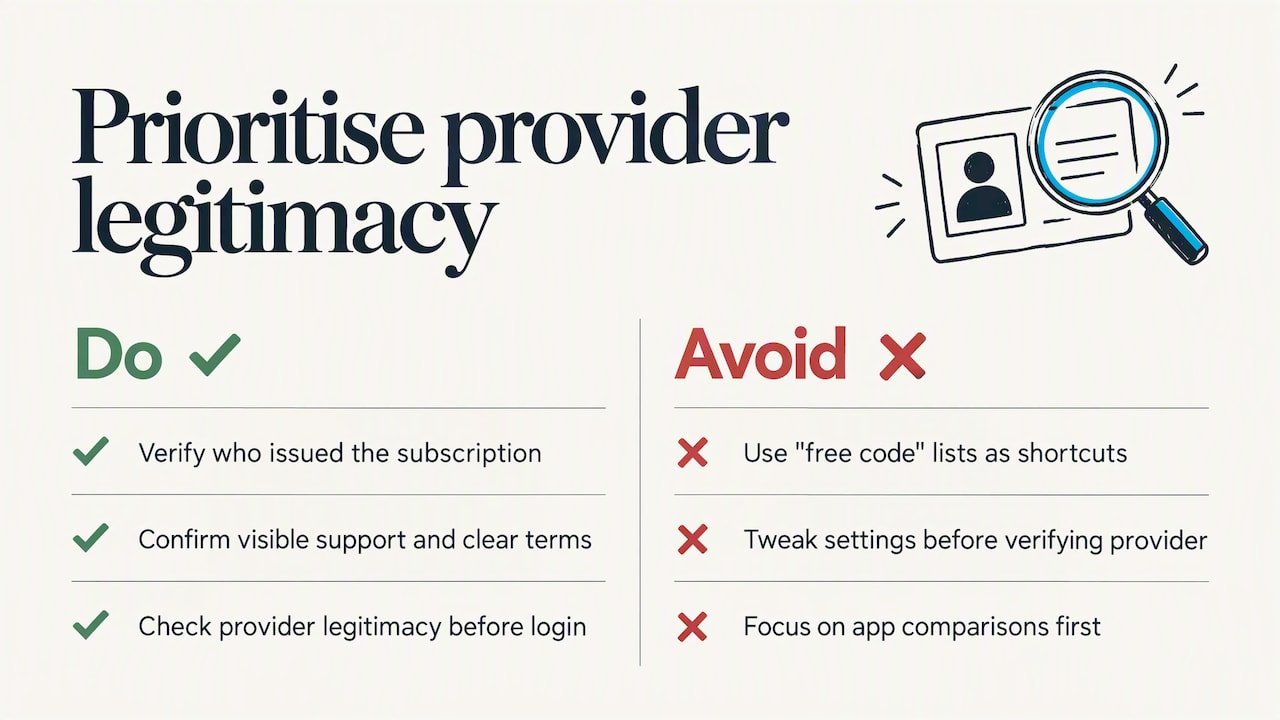
Too many guides spend their energy on app comparisons and skip the question of where the subscription actually came from. That ordering is backwards. Pick a provider you can verify, with visible support and clear terms, before you touch a single settings screen. The format, whether Xtream API or M3U, is secondary to that choice.
If you take one thing from this: treat “free code” lists as a warning sign rather than a shortcut, and spend the extra few minutes checking a provider’s legitimacy before you ever open your player’s login screen.
— AYOUB
Get Xtream-compatible access without the guesswork
We issue Xtream Codes credentials that work directly in the players covered above, so there is no need to chase public lists or unverified “activation codes.” Every plan includes a large selection of live channels and films and series, along with built-in VPN protection and anti-freeze technology, backed by a refund policy if the service does not suit your setup.
Current pricing details are available on our pricing page. If you have already decided on a plan, you can head straight to complete your order and have your credentials ready to add into your player today.
FAQ
Is there a free code for Xtream IPTV?
Genuinely free, reliably working Xtream codes are not a realistic option, since legitimate channel and VOD access has to be licensed and paid for somewhere along the chain. Codes advertised as free are usually unauthorised, short-lived or tied to accounts that get shut down without notice.
Where can I find GitHub Xtream codes for IPTV?
GitHub hosts open-source Xtream-capable player projects, such as player code repositories, but these provide software rather than verified content access. You still need an authorised host, username and password from a legitimate provider to use them safely.
How do I find a code for IPTV?
A working Xtream Codes login comes from subscribing directly with an IPTV provider, who then issues you a host address, username and password by email or account dashboard. There is no separate “code” to search for beyond these three credentials.
Where can I find a list of available IPTV codes?
Public lists of IPTV codes circulating online are not a safe source, since they rarely confirm the content is licensed and often stop working quickly. The reliable route is subscribing with a provider directly and receiving your own unique credentials.